Excel Skills Employers Actually Test in Interviews
Why Excel still matters
Job descriptions for accounts executives, MIS executives, sales coordinators, HR assistants, data analysts and operations roles regularly list “good knowledge of Excel”. Many companies give a practical Excel test in the interview. Even with newer tools, Excel (or Google Sheets, which works almost the same way) is the everyday tool for reports, data and calculations.
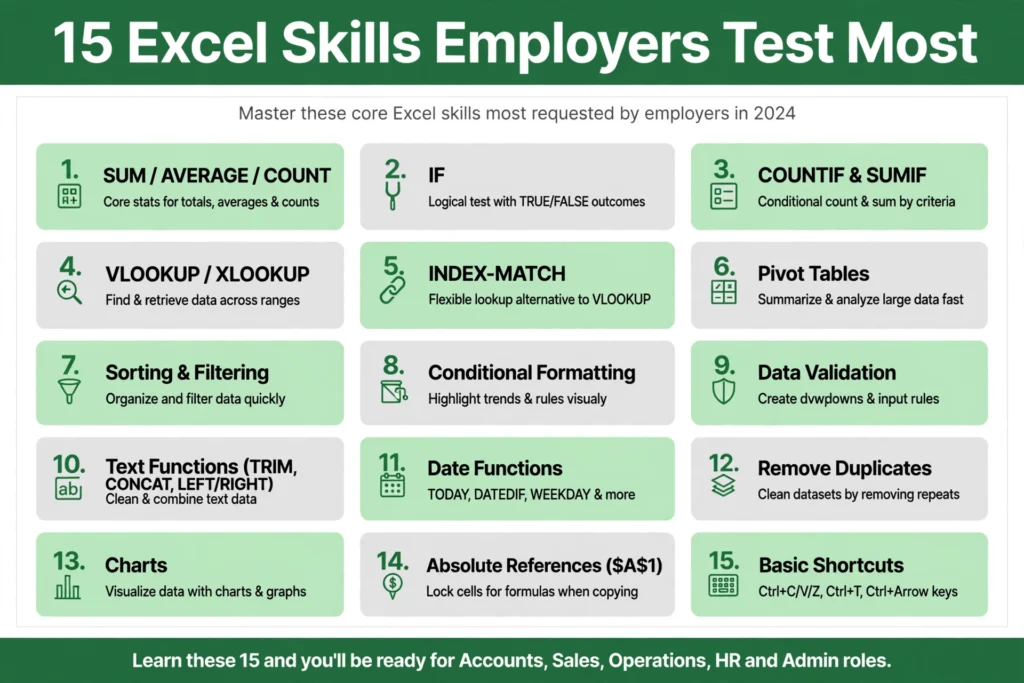
The 15 skills (with simple examples)
Level 1: The basics
1. SUM, AVERAGE, COUNT, MIN, MAX
=SUM(B2:B50) adds all sales. =AVERAGE(B2:B50) gives the average order value.
2. Absolute and relative references
$A$1 stays fixed when you copy a formula. This is essential for things like calculating GST on every row using one tax-rate cell: =B2*$F$1.
3. Sorting and filtering
Sort sales from highest to lowest, or filter only one city or one salesperson.
4. Removing duplicates
Data → Remove Duplicates cleans repeated customer entries.
5. Basic charts
Column charts for monthly sales, line charts for trends, pie charts (sparingly) for share.
Level 2: Everyday formulas
6. IF
=IF(C2>=40,”Pass”,”Fail”) or =IF(B2>100000,”Target met”,”Below target”)
7. COUNTIF and SUMIF (and COUNTIFS, SUMIFS)
=COUNTIF(D2:D500,”Indore”) counts customers from Indore. =SUMIFS(E2:E500,D2:D500,”Indore”,F2:F500,”Paid”) adds paid sales from Indore.
8. VLOOKUP and XLOOKUP
Find a price from a product list: =VLOOKUP(A2,Products!A:C,3,FALSE) XLOOKUP (in newer Excel versions) is simpler and more flexible: =XLOOKUP(A2,Products!A:A,Products!C:C)
9. Text functions
=TRIM(A2) removes extra spaces; =PROPER(A2) fixes name capitalisation; =LEFT(A2,5) takes the first 5 characters; =A2&” “&B2 or =CONCAT(A2,” “,B2) joins first and last names.
10. Date functions
=TODAY(), =DATEDIF(B2,TODAY(),”y”) for age or years of service, =EOMONTH(A2,0) for month-end due dates.
Level 3: What makes you stand out
11. Pivot Tables
Summarise thousands of rows in seconds: sales by month and region, leads by source, expenses by category. This is one of the most tested skills.
12. INDEX and MATCH
A powerful lookup that works in any direction: =INDEX(C:C,MATCH(A2,A:A,0))
13. Conditional formatting
Highlight overdue invoices in red, top performers in green, or duplicates automatically.
14. Data validation (drop-down lists)
Create drop-downs for status (“New”, “In progress”, “Closed”) to keep data clean.
15. Keyboard shortcuts
| Shortcut | What it does |
| Ctrl + Arrow keys | Jump to the end of data |
| Ctrl + Shift + L | Turn filters on or off |
| Ctrl + T | Convert data into a table |
| Alt + = | AutoSum |
| Ctrl + ; | Insert today’s date |
| F4 | Toggle absolute references |
Common Excel interview tasks
| Task | Skills tested |
| “Find the total sales per region from this data” | Pivot table or SUMIF |
| “Fetch the price of each product from the price list” | VLOOKUP or XLOOKUP |
| “Mark customers who haven’t paid in 30 days” | IF, dates, conditional formatting |
| “Clean this list of names and phone numbers” | TRIM, PROPER, remove duplicates |
| “Make a chart of monthly sales” | Charts |
14-day practice plan
| Days | Focus |
| 1–3 | Basics, references, sorting, filtering, charts |
| 4–6 | IF, COUNTIF, SUMIF, text and date functions |
| 7–9 | VLOOKUP, XLOOKUP, INDEX-MATCH |
| 10–12 | Pivot tables, conditional formatting, data validation |
| 13–14 | Practise full tasks with sample sales or attendance data, under time limits |
Where to learn free: Microsoft’s free Excel training, YouTube tutorials, and government platforms like SWAYAM and Skill India Digital. See our list of free online courses.
How to show Excel skills on your resume
Don’t write just “MS Excel”. Be specific: “Advanced Excel: Pivot Tables, XLOOKUP, SUMIFS, conditional formatting, data validation; prepared weekly MIS sales reports for 5 branches.”
Frequently asked questions
What Excel skills are required for jobs?
Most jobs expect basic formulas, IF, COUNTIF/SUMIF, VLOOKUP or XLOOKUP, pivot tables, sorting, filtering and charts.
What is “advanced Excel” in job descriptions?
It usually means pivot tables, lookups (VLOOKUP, XLOOKUP, INDEX-MATCH), conditional formatting, data validation and sometimes macros or Power Query.
Is Google Sheets the same as Excel?
Most functions are the same or very similar. Learning one makes the other easy.
How long does it take to learn Excel for a job?
With daily practice, many people learn job-ready basics in 2–4 weeks.
Should I learn VLOOKUP or XLOOKUP?
Learn both. Many companies still use older Excel versions where XLOOKUP isn’t available.