WhatsApp Marketing for Small Businesses in India: A Complete Playbook
For most small businesses in India, the sale doesn’t close on a website — it closes on WhatsApp. Here’s how to actually set up and use WhatsApp Business as a real sales and marketing channel, not just a place customers happen to message you.
Set Up Your Business Profile Properly
Switch from a personal number to WhatsApp Business (free), and fill in every field: business category, address, description, website, and hours. This alone makes your chat look like a real business rather than a personal contact, which noticeably affects how seriously new customers take your replies.
Build a Real Catalogue
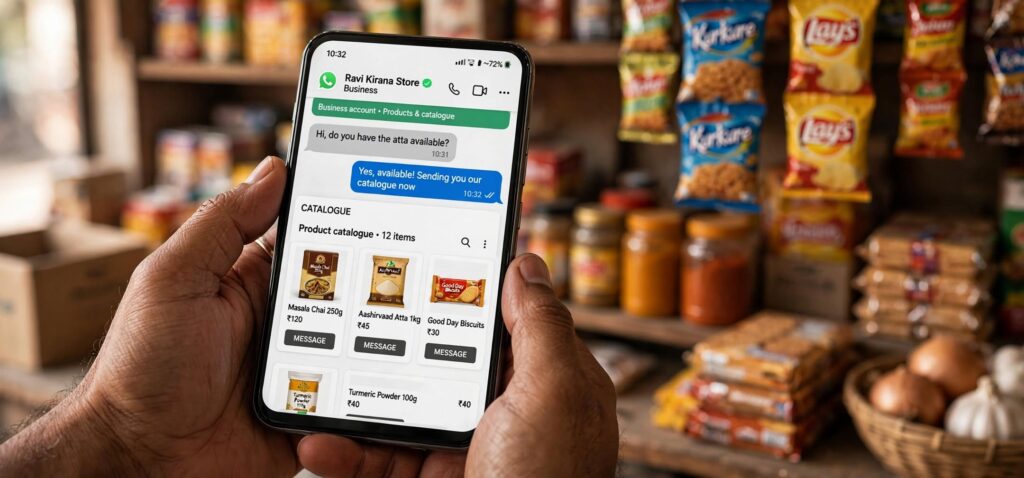
WhatsApp Business lets you upload products with photos, prices and descriptions directly into a browsable catalogue inside the app — customers can view and share it without you sending individual photos every time someone asks ‘what do you have.’ This alone saves enormous repetitive messaging time once it’s set up.
Use Quick Replies and Labels
Quick Replies let you save common answers (pricing, delivery timelines, payment options) to a shortcut, so you’re not retyping the same message dozens of times a day. Labels let you tag chats (New Order, Payment Pending, Completed) so you can track your sales pipeline without a separate CRM tool.
Set Greeting and Away Messages
A greeting message for first-time contacts and an away message outside business hours both reduce the number of customers who message and, hearing nothing back quickly, simply move on to a competitor. This is one of the most commonly skipped features and one of the highest-impact ones for a small business relying on fast response times.
Broadcast Lists, Used Carefully
Broadcast lists let you message multiple customers at once without a group chat (recipients don’t see each other). Use this sparingly and only for customers who’ve opted in — for new arrivals, festive offers, or restock alerts. Overusing broadcasts, or messaging people who haven’t engaged with your business recently, tends to get you blocked rather than build sales.
When to Consider the WhatsApp Business API
If you’re outgrowing manual replies — high message volume, needing automated order confirmations, or wanting to integrate WhatsApp with your website or inventory system — the WhatsApp Business API (typically accessed through a paid provider) supports automation and multi-agent access that the free app doesn’t. Most small businesses don’t need this until they’re handling a genuinely high daily message volume.
Frequently Asked Questions
Is WhatsApp Business free to use?
Yes, the WhatsApp Business app itself is free and includes the catalogue, quick replies, labels, and greeting/away message features. The WhatsApp Business API, needed for automation at scale, typically involves a paid provider.
How do I stop customers from ignoring my WhatsApp broadcasts?
Only broadcast to customers who’ve opted in and engaged recently, and keep broadcasts genuinely useful (new arrivals, real offers) rather than frequent — overuse is the most common reason businesses get blocked.
What’s the single most underused WhatsApp Business feature?
Greeting and away messages. Many small businesses skip them, but they directly reduce how many potential customers give up and go elsewhere after not getting a fast reply.