What Is ONDC and How Can Small Sellers Join It?
What is ONDC?
ONDC is an initiative of the Department for Promotion of Industry and Internal Trade (DPIIT), set up as a not-for-profit company. Its aim is to make online commerce open and fair, so that small businesses aren’t dependent on one large marketplace.
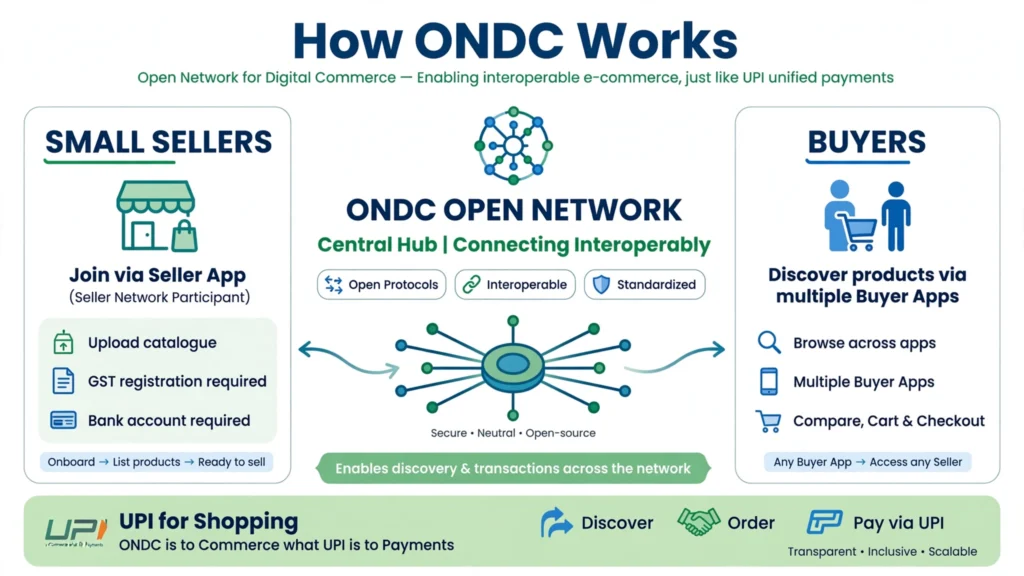
Think of it like UPI for shopping. With UPI, you can pay from any app to any app. With ONDC, a seller on one app can sell to a buyer on a different app.
How ONDC works
| Participant | Role | Example |
| Buyer app | Where customers search and order | Consumer apps connected to ONDC |
| Seller app | Where sellers list products and manage orders | Seller platforms and software providers connected to ONDC |
| Logistics provider | Delivers the order | Delivery partners connected to the network |
| ONDC network | Common rules and protocols that let these apps talk to each other | — |
When a customer searches for “organic ghee” on a buyer app, the network shows matching products from sellers on many different seller apps.
Benefits for small sellers
- Wider reach: your products can appear on several buyer apps through one listing
- Less dependence on one platform: you’re not locked into a single marketplace’s rules
- Potentially lower costs: ONDC is designed to lower discovery costs, though actual fees depend on your seller app
- Local discovery: good for neighbourhood shops, restaurants and local brands
- Many categories: grocery, food, fashion, home and kitchen, electronics, beauty and more
How to join ONDC: step by step
ONDC itself doesn’t run a single seller dashboard. Pick a seller-side network participant. You can see the list of live network participants on the official ONDC website (ondc.org).
Compare seller apps on:
- Fees and commission
- Categories they support
- Ease of catalogue upload
- Payment settlement time
- Logistics support
- Customer support and language options
Step 2: Register with the seller app
Typical details asked:
- Business name and address
- GSTIN (often required for most categories; some apps allow certain non-GST sellers, so check)
- PAN
- Bank account and IFSC
- FSSAI licence number (for food items)
- Udyam registration (helpful, sometimes requested)
Step 3: Upload your catalogue
Add product names, clear photos, prices, stock levels, descriptions, weight and size, and return policy. Good product information matters a lot on an open network, because buyer apps rely on it to show your products.
Step 4: Set delivery and service area
Choose whether you’ll deliver yourself or use the seller app’s logistics partners. Set your serviceable pin codes or radius.
Step 5: Go live and manage orders
Accept orders on time, pack carefully, update order status, and handle returns and complaints quickly. Ratings affect how often your products are shown.
Tips to succeed on ONDC
- Start with your best-selling products rather than uploading everything.
- Use clear photos on a plain background.
- Write detailed descriptions with size, weight, material, ingredients and usage.
- Price competitively, including delivery costs.
- Fulfil orders reliably. Cancellations hurt your visibility.
- Promote your store on WhatsApp and social media.
- Track settlements and reconcile payments weekly.
ONDC vs marketplaces: quick comparison
| Point | ONDC (via seller app) | Single large marketplace |
| Reach | Many buyer apps on the network | One platform’s customers |
| Control | More control over listing and pricing | Platform rules decide |
| Fees | Depends on the seller app; designed to be lower | Commission plus fees set by the platform |
| Customer base | Growing; strongest in some categories and cities | Very large and established |
| Best for | Local sellers, grocers, restaurants, D2C brands | Sellers wanting maximum immediate demand |
Many sellers use both: ONDC for wider reach, plus marketplaces where demand is highest.
Frequently asked questions
Is ONDC registration free?
ONDC doesn’t charge sellers directly. Your seller app may charge subscription fees or a commission, so check before you sign up.
Can I sell on ONDC without GST?
Most seller apps ask for GST. Some may allow certain categories without it. Check with the seller app.
Can restaurants and cloud kitchens join ONDC?
Yes. Food and beverages is one of the main categories on ONDC. You’ll need an FSSAI licence or registration.
Who runs ONDC?
ONDC is an initiative of DPIIT, Government of India, run as a not-for-profit company.
How do I get paid on ONDC?
Payments are settled through the network’s settlement process to your bank account. Timelines depend on your seller app, so confirm the settlement cycle.
Sources (checked 28 October 2026)
- ONDC official website and list of network participants: ondc.org
- DPIIT: dpiit.gov.in
Suggested internal links:Free tools for new entrepreneurs · GST registration guide · SEO and social media playbook