AI Skills for Non-Techies: How to Use AI Tools at Work Without Coding
Why AI skills matter now
Employers increasingly expect staff to use AI tools to work faster: drafting emails and reports, summarising documents, analysing data, creating social media posts and answering customer questions. People who can use AI well, and know its limits, often get more done and stand out in interviews.
The good news: the core skills are about thinking and communicating clearly, not programming.
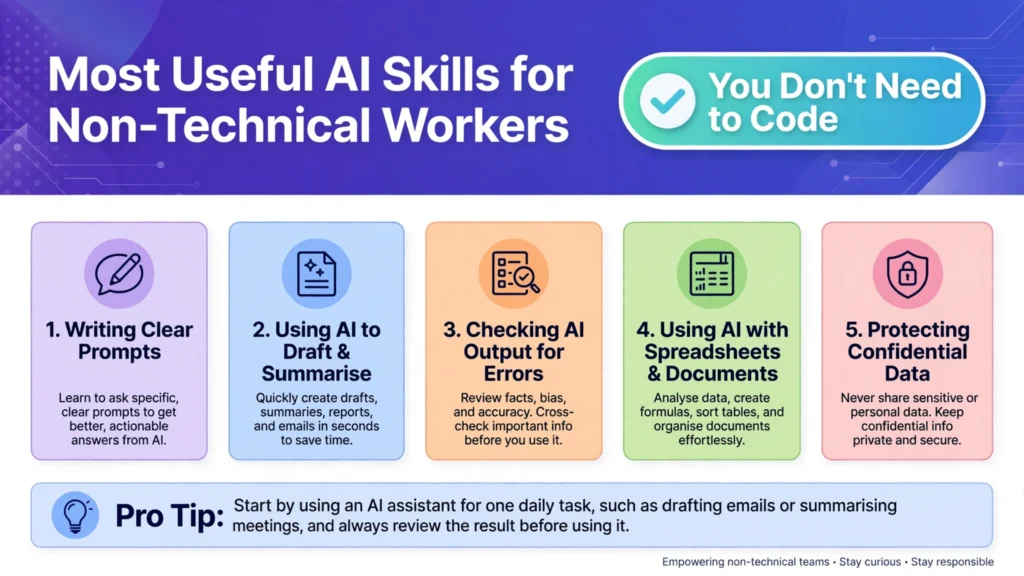
The 6 core AI skills for non-techies
1. Writing clear prompts
A prompt is the instruction you give an AI tool. Better prompts give better results.
A simple prompt formula:
Role + Task + Context + Format + Tone
Weak prompt: “Write an email about the delay.”
Strong prompt: “You’re a customer service executive at a furniture company. Write a polite email to a customer explaining that their sofa delivery is delayed by 5 days because of a supplier issue. Offer a 5% discount voucher. Keep it under 120 words, friendly and professional.”
2. Drafting and editing
Use AI to create first drafts of emails, reports, proposals, job descriptions, social media posts and product descriptions. Then edit them to add facts, your company’s style and your own judgement.
3. Summarising and extracting information
Paste a long document (if company policy allows) and ask for: key points, action items, deadlines, or a comparison table.
4. Working with data
Many AI tools can explain Excel formulas, write formulas from a plain-language request, or help find patterns in data you share. Example: “Write an Excel formula that marks invoices overdue if the due date in column D is before today and status in column E is not ‘Paid’.”
5. Checking and fact-checking
AI can sound confident and still be wrong. It can invent facts, figures, names or sources. Always:
- Verify numbers, laws, prices and dates from official sources
- Check calculations
- Read the whole output before sending
This judgement is itself a valued skill.
6. Using AI safely and responsibly
- Don’t paste confidential data (customer details, passwords, financial data, unreleased plans) into AI tools unless your company has approved that tool
- Follow your company’s AI policy
- Don’t present AI-generated work as checked facts without verifying it
- Be careful with images or text that could copy someone else’s work
AI use cases by job role
| Role | Practical AI uses |
| Sales | Drafting follow-up messages, preparing for client calls, summarising meeting notes |
| Marketing | Content ideas, captions, ad copy variations, blog outlines |
| HR | Job descriptions, interview questions, policy drafts, onboarding checklists |
| Accounts and admin | Explaining formulas, drafting payment reminders, summarising documents |
| Customer support | Drafting replies, creating FAQ answers, translating messages |
| Small business owners | Product descriptions, WhatsApp messages, simple business plans |
A 2-week plan to build AI skills
| Days | Practice |
| 1–3 | Use AI to draft 3 emails a day; compare with what you’d write |
| 4–6 | Summarise long articles or reports; check accuracy against the original |
| 7–9 | Ask AI to explain and write Excel formulas; test them |
| 10–12 | Create a content plan or presentation outline for a real task |
| 13–14 | Build a personal “prompt library” of your 10 best prompts |
How to show AI skills on your resume
Be specific about outcomes:
- “Used AI tools to draft and personalise client follow-ups, reducing response time by 40%.”
- “Created weekly social media content calendars using AI-assisted drafting and manual editing.”
In interviews, give an example of a task you completed with AI and how you checked the output.
For freelancers, see our guide on AI tools for freelancers.
Frequently asked questions
Do I need coding to learn AI skills?
No. Most workplace AI skills involve writing clear instructions, reviewing output and using AI inside everyday tools.
Which AI skills are most in demand?
Prompt writing, drafting and editing with AI, summarising information, working with data, and responsible use, including verifying output.
Will AI take my job?
AI is changing many jobs by automating parts of tasks. People who learn to use AI well, and add human judgement, are generally better placed.
Is it safe to put company data into AI tools?
Only if your company has approved the tool for that data. Never share passwords, customer data or confidential information otherwise.
Where can I learn AI skills for free?
Many AI providers offer free learning resources, and government platforms like Skill India Digital and SWAYAM list courses on AI and digital skills.